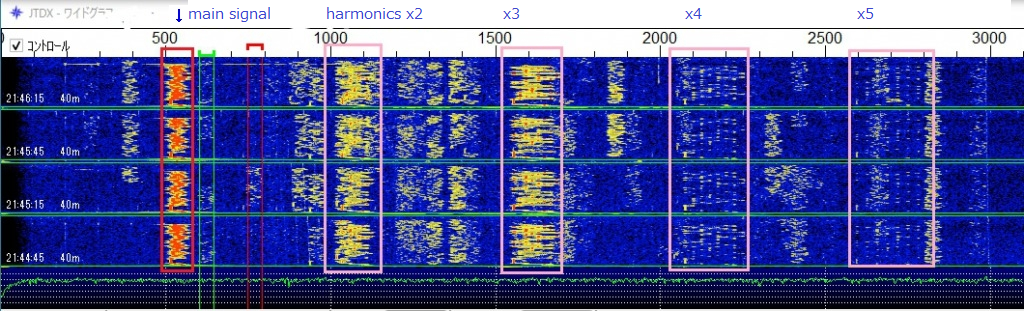
Have you ever been bothered by harmonics while operating FT8?
If the setup is incorrect, you may also be transmitting harmonics unintentionally.
Harmonic generation can be prevented by proper software configuration.
However, the radio must be controlled via CAT.
The method for configuring WSJT-X / JTDX is almost the same.
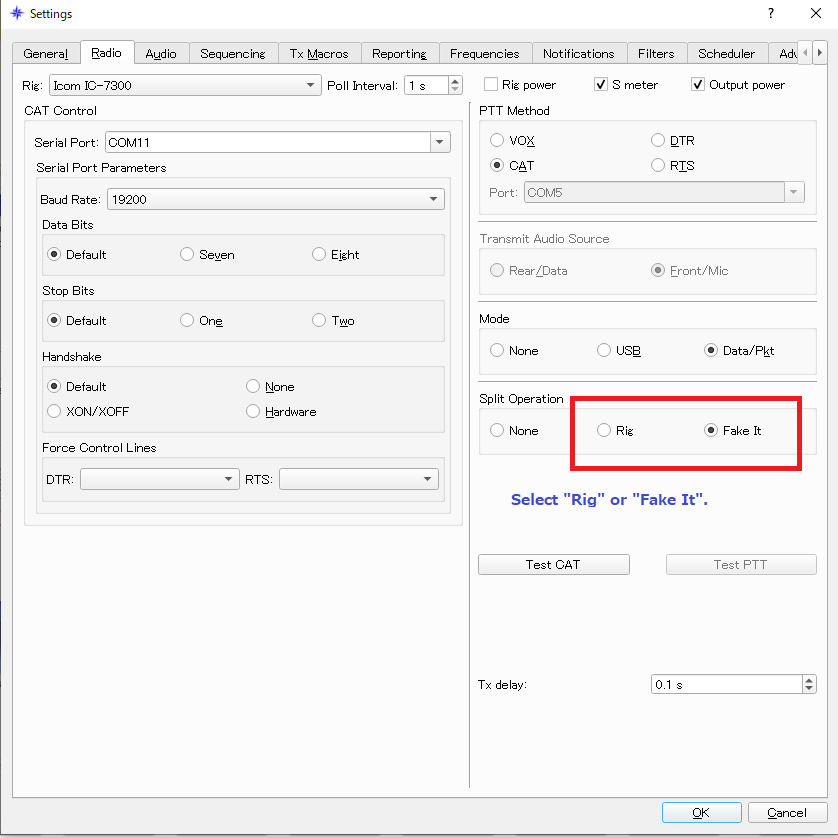
Configuration in MSHV is also shown in the image.
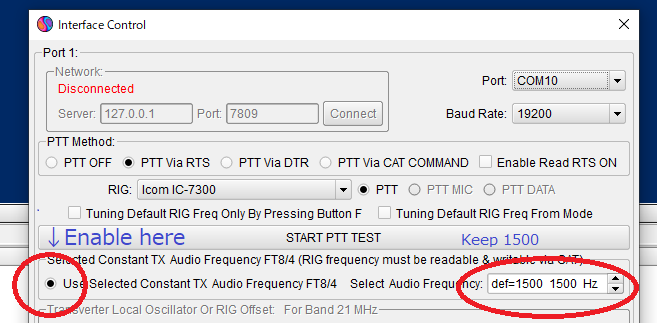
This prevents harmonic generation.
Please share this information with your friends.
Also, in some stations, the audio input level may appear too high for the rig.
Sometimes spurious signals are transmitted at the same time.
The adjustment method is as follows. This method is the same for JTDX / WSJT-X / MSHV. Use the output adjustment slider: top-right slider for JTDX, bottom-right slider for WSJT-X and MSHV.
The adjustment method is as follows. This method is the same for JTDX / WSJT-X / MSHV. Use the output adjustment slider: top-right slider for JTDX, bottom-right slider for WSJT-X and MSHV.
- Set rig output to 100%.
- Set the software output slider to maximum.
- Enable ALC display on the rig.
- Try transmitting on the appropriate frequency. You may call CQ or something like "VVV [your call]". Adjustment during actual communication is fine as well.
- Check the ALC meter on the rig. In most cases, ALC will swing.
- Reduce the output slider slightly.
- Check if the ALC swing decreases. Usually, the output itself does not decrease.
- Set the slider just before the point where the output begins to drop. At this time, points on the ALC meter should not indicate anything.
- Depending on your rig, the slider position may vary for each band.
- From now on, the output should be controlled only by this slider, not the rig.
WSJT-X / JTDX can save output for each band.
If output is adjusted using the Tune button, the slider position may not reflect during FT8 operation.
Remember the slider position during Tune and adjust during operation, or adjust when transmitting FT8 without using Tune.
Negative dB values are shown while moving the slider.
https://wsjt.sourceforge.io/wsjtx-doc/wsjtx-main-2.7.0.html#RADIO
The WSJT-X manual (the section linked above) also instructs users to select either RIG or Fake It under the Radio settings. The same applies to JTDX. If you select None, your output power will be unstable near the band edges, and you are much more likely to transmit harmonic signals — there is absolutely nothing to gain from choosing None. If your transceiver supports CAT control, you must select either RIG or Fake It. This will stabilize your output and save you from being the operator everyone complains about for splattering harmonics.
The FT8 signal is single-tone, similar to a CW signal per unit time.
Therefore, small ALC swings are generally not a problem.
Of course, excessive audio input causing the ALC meter to exceed the normal range can distort even a single-tone signal.
If the PC audio signal itself is distorted, the radio wave will also be distorted.
The best way to prevent this is to avoid excessive ALC swings.
This is a "precautionary" setting, as it prevents excessive audio input to the rig.
de JP1LRT Yoshiharu