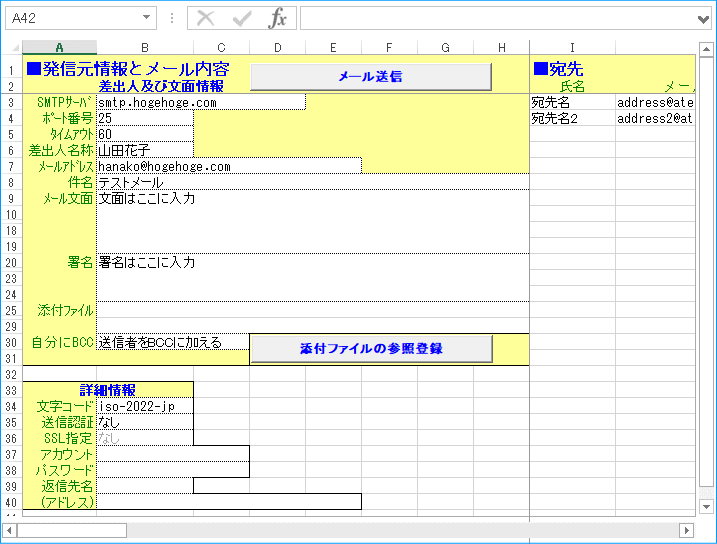
| SMTPサーバ | 送信メールサーバ名、又はIPアドレス(DNSが参照できない場合はIPアドレス) |
| 発信者 | 発信者のメールアドレス 日本語名を含める場合は"山田太郎 <yamada@hoge.co.jp>"のように 半角の大小記号にメールアドレスを挟んで編集して下さい。 |
| 宛先 | 宛先ののメールアドレス(最初は自分自身としてみて下さい。) 日本語名を含める場合は"山田太郎 <yamada@hoge.co.jp>"のように 半角の大小記号にメールアドレスを挟んで編集して下さい。 |
'*******************************************************************************
' CDOでメールを送信する
'
' 作成者:井上治 URL:http://www.ne.jp/asahi/excel/inoue/ [Excelでお仕事!]
'*******************************************************************************
' [参照設定]
' ・Microsoft CDO for Windows 2000 Library
' (or Microsoft CDO for Exchange 2000 Library)
'*******************************************************************************
Option Explicit
'*******************************************************************************
' メール送信テストプログラム
'*******************************************************************************
Sub TEST()
Dim MailSmtpServer As String
Dim MailFrom As String
Dim MailTo As String
Dim MailSubject As String
Dim MailBody As String
Dim strMSG As String
' 送信確認
If MsgBox("メールを送信します。" & vbCr & _
"SMTP,発信者,宛先等は正しいですか?", vbYesNo) <> vbYes Then Exit Sub
MailSmtpServer = Cells(1, 2).Text ' SMTPサーバ
MailFrom = Cells(2, 2).Text ' 発信者
MailTo = Cells(3, 2).Text ' 宛先
MailSubject = Cells(4, 2).Text ' 件名
MailBody = Cells(5, 2).Text ' 本文
' メール送信(CC,BCCはブランク)
strMSG = SendMailByCDO(MailSmtpServer, MailFrom, MailTo, "", "", _
MailSubject, MailBody)
' 文字コードを任意に指定する場合は以下のようにします。
' strMSG = SendMailByCDO(MailSmtpServer, MailFrom, MailTo, "", "", _
MailSubject, MailBody, "", cdoISO_2022_JP)
If strMSG <> "OK" Then MsgBox Mid(strMSG, 3)
End Sub
'*******************************************************************************
' メール送信テストプログラム(添付ファイルあり)
'*******************************************************************************
Sub TEST2()
Dim MailSmtpServer As String
Dim MailFrom As String
Dim MailTo As String
Dim MailSubject As String
Dim MailBody As String
Dim MailAddFile As Variant
Dim strMSG As String
' 添付ファイルの選択
MailAddFile = Application.GetOpenFilename("全てのファイル (*.*),*.*",, _
"添付ファイルを選択して下さい。",, True)
' 送信確認
If MsgBox("メールを送信します。" & vbCr & _
"SMTP,発信者,宛先等は正しいですか?", vbYesNo) <> vbYes Then Exit Sub
MailSmtpServer = Cells(1, 2).Text ' SMTPサーバ
MailFrom = Cells(2, 2).Text ' 発信者
MailTo = Cells(3, 2).Text ' 宛先
MailSubject = Cells(4, 2).Text ' 件名
MailBody = Cells(5, 2).Text ' 本文
' メール送信(CC,BCCはブランク)
strMSG = SendMailByCDO(MailSmtpServer, MailFrom, MailTo, "", "", _
MailSubject, MailBody, MailAddFile)
' 文字コードを任意に指定する場合は以下のようにします。
' strMSG = SendMailByCDO(MailSmtpServer, MailFrom, MailTo, "", "", _
MailSubject, MailBody, MailAddFile, cdoISO_2022_JP)
If strMSG <> "OK" Then MsgBox Mid(strMSG, 3)
End Sub
'*******************************************************************************
' メール送信(CDO)
'*******************************************************************************
' [引数]
' @MailSmtpServer : SMTPサーバ名(又はIPアドレス)
' AMailFrom : 送信元アドレス
' BMailTo : 宛先アドレス(複数の場合はカンマで区切る)
' CMailCc : CCアドレス(複数の場合はカンマで区切る)
' DMailBcc : BCCアドレス(複数の場合はカンマで区切る)
' EMailSubject : 件名
' FMailBody : 本文(改行はvbCrLf付加)
' GMailAddFile : 添付ファイル(複数の場合はカンマで区切るか配列渡し) ※Option
' HMailCharacter : 文字コード指定(デフォルトはShift-JIS) ※Option
' [戻り値]
' 正常時:"OK", エラー時:"NG"+エラーメッセージ
'*******************************************************************************
Private Function SendMailByCDO(MailSmtpServer As String, _
MailFrom As String, _
MailTo As String, _
MailCc As String, _
MailBcc As String, _
MailSubject As String, _
MailBody As String, _
Optional MailAddFile As Variant, _
Optional MailCharacter As String)
Const cnsOK = "OK"
Const cnsNG = "NG"
Dim objCDO As New CDO.Message
Dim vntFILE As Variant
Dim IX As Long
Dim strCharacter As String, strBody As String, strChar As String
On Error GoTo SendMailByCDO_ERR
SendMailByCDO = cnsNG
' 文字コード指定の確認
If MailCharacter <> "" Then
' 指定ありの場合は指定値をセット
strCharacter = MailCharacter
Else
' 指定なしの場合はShift-JISとする
strCharacter = cdoShift_JIS
End If
' 本文の改行コードの確認
' Lfのみの場合Cr+Lfに変換
strBody = Replace(MailBody, vbLf, vbCrLf)
' 上記で元がCr+Lfの場合Cr+Cr+LfになるのでCr+Lfに戻す
MailBody = Replace(strBody, vbCr & vbCrLf, vbCrLf)
With objCDO
With .Configuration.Fields ' 設定項目
.Item(cdoSendUsingMethod) = cdoSendUsingPort ' 外部SMTP指定
.Item(cdoSMTPServer) = MailSmtpServer ' SMTPサーバ名
.Item(cdoSMTPServerPort) = 25 ' ポート
.Item(cdoSMTPConnectionTimeout) = 60 ' タイムアウト
.Item(cdoSMTPAuthenticate) = cdoAnonymous ' 0
.Item(cdoLanguageCode) = strCharacter ' 文字セット指定
.Update ' 設定を更新
End With
.MimeFormatted = True
.Fields.Update
.From = MailFrom ' 送信者
.To = MailTo ' 宛先
If MailCc <> "" Then .CC = MailCc ' CC
If MailBcc <> "" Then .BCC = MailBcc ' BCC
.Subject = MailSubject ' 件名
.TextBody = MailBody ' 本文
.TextBodyPart.Charset = strCharacter ' 文字セット指定(本文)
' 添付ファイルの登録(複数対応)
If ((VarType(MailAddFile) <> vbError) And _
(VarType(MailAddFile) <> vbBoolean) And _
(VarType(MailAddFile) <> vbEmpty) And _
(VarType(MailAddFile) <> vbNull)) Then
If IsArray(MailAddFile) Then
For IX = LBound(MailAddFile) To UBound(MailAddFile)
.AddAttachment MailAddFile(IX)
Next IX
ElseIf MailAddFile <> "" Then
vntFILE = Split(CStr(MailAddFile), ",")
For IX = LBound(vntFILE) To UBound(vntFILE)
If Trim(vntFILE(IX)) <> "" Then
.AddAttachment Trim(vntFILE(IX))
End If
Next IX
End If
End If
.Send ' 送信
End With
Set objCDO = Nothing
SendMailByCDO = cnsOK
Exit Function
'-------------------------------------------------------------------------------
SendMailByCDO_ERR:
SendMailByCDO = cnsNG & Err.Number & " " & Err.Description
On Error Resume Next
Set objCDO = Nothing
End Function
'-----------------------------<< End of Source >>-------------------------------


Const cdoSendUsingMethod = "HOGEHOGE"

'*******************************************************************************
' CDOでメールを送信する
'
' 作成者:井上治 URL:http://www.ne.jp/asahi/excel/inoue/ [Excelでお仕事!]
'*******************************************************************************
Option Explicit
' CDO関連の定数
Const cdoSendUsingMethod = _
"http://schemas.microsoft.com/cdo/configuration/sendusing"
Const cdoSMTPServer = "http://schemas.microsoft.com/cdo/configuration/smtpserver"
Const cdoSMTPServerPort = _
"http://schemas.microsoft.com/cdo/configuration/smtpserverport"
Const cdoSMTPConnectionTimeout = _
"http://schemas.microsoft.com/cdo/configuration/smtpconnectiontimeout"
Const cdoSMTPAuthenticate = _
"http://schemas.microsoft.com/cdo/configuration/smtpauthenticate"
Const cdoSendUsingPort = 2
Const cdoAnonymous = 0
Const cdoLanguageCode = _
"http://schemas.microsoft.com/cdo/configuration/languagecode"
' 以下は文字コード指定(一部)
Const cdoShift_JIS = "shift-jis"
Const cdoEUC_JP = "euc-jp"
Const cdoISO_2022_JP = "iso-2022-jp"
Const cdoUTF_7 = "utf-7"
Const cdoUTF_8 = "utf-8"
'*******************************************************************************
' メール送信テストプログラム(添付ファイルなし)
'*******************************************************************************
Sub TEST()
Dim MailSmtpServer As String
Dim MailFrom As String
Dim MailTo As String
Dim MailSubject As String
Dim MailBody As String
Dim strMSG As String
' 送信確認
If MsgBox("メールを送信します。" & vbCr & _
"SMTP,発信者,宛先等は正しいですか?", vbYesNo) <> vbYes Then Exit Sub
MailSmtpServer = Cells(1, 2).Text ' SMTPサーバ
MailFrom = Cells(2, 2).Text ' 発信者
MailTo = Cells(3, 2).Text ' 宛先
MailSubject = Cells(4, 2).Text ' 件名
MailBody = Cells(5, 2).Text ' 本文
' メール送信(CC,BCCはブランク)
strMSG = SendMailByCDO(MailSmtpServer, MailFrom, MailTo, "", "", _
MailSubject, MailBody)
' 文字コードを任意に指定する場合は以下のようにします。
' strMSG = SendMailByCDO(MailSmtpServer, MailFrom, MailTo, "", "", _
MailSubject, MailBody, "", cdoISO_2022_JP)
If strMSG <> "OK" Then MsgBox Mid(strMSG, 3)
End Sub
'*******************************************************************************
' メール送信テストプログラム(添付ファイルあり)
'*******************************************************************************
Sub TEST2()
Dim MailSmtpServer As String
Dim MailFrom As String
Dim MailTo As String
Dim MailSubject As String
Dim MailBody As String
Dim MailAddFile As Variant
Dim strMSG As String
' 添付ファイルの選択
MailAddFile = Application.GetOpenFilename("全てのファイル (*.*),*.*",, _
"添付ファイルを選択して下さい。",, True)
' 送信確認
If MsgBox("メールを送信します。" & vbCr & _
"SMTP,発信者,宛先等は正しいですか?", vbYesNo) <> vbYes Then Exit Sub
MailSmtpServer = Cells(1, 2).Text ' SMTPサーバ
MailFrom = Cells(2, 2).Text ' 発信者
MailTo = Cells(3, 2).Text ' 宛先
MailSubject = Cells(4, 2).Text ' 件名
MailBody = Cells(5, 2).Text ' 本文
' メール送信(CC,BCCはブランク)
strMSG = SendMailByCDO(MailSmtpServer, MailFrom, MailTo, "", "", _
MailSubject, MailBody, MailAddFile)
' 文字コードを任意に指定する場合は以下のようにします。
' strMSG = SendMailByCDO(MailSmtpServer, MailFrom, MailTo, "", "", _
MailSubject, MailBody, MailAddFile, cdoISO_2022_JP)
If strMSG <> "OK" Then MsgBox Mid(strMSG, 3)
End Sub
'*******************************************************************************
' メール送信(CDO) ※実行時バインディング
'*******************************************************************************
' [引数]
' @MailSmtpServer : SMTPサーバ名(又はIPアドレス)
' AMailFrom : 送信元アドレス
' BMailTo : 宛先アドレス(複数の場合はカンマで区切る)
' CMailCc : CCアドレス(複数の場合はカンマで区切る)
' DMailBcc : BCCアドレス(複数の場合はカンマで区切る)
' EMailSubject : 件名
' FMailBody : 本文(改行はvbCrLf付加)
' GMailAddFile : 添付ファイル(複数の場合はカンマで区切るか配列渡し) ※Option
' HMailCharacter : 文字コード指定(デフォルトはShift-JIS) ※Option
' [戻り値]
' 正常時:"OK", エラー時:"NG"+エラーメッセージ
'*******************************************************************************
Private Function SendMailByCDO(MailSmtpServer As String, _
MailFrom As String, _
MailTo As String, _
MailCc As String, _
MailBcc As String, _
MailSubject As String, _
MailBody As String, _
Optional MailAddFile As Variant, _
Optional MailCharacter As String)
Const cnsOK = "OK"
Const cnsNG = "NG"
Dim objCDO As Object ' Object型に変更
Dim vntFILE As Variant
Dim IX As Long
Dim strCharacter As String, strBody As String, strChar As String
On Error GoTo SendMailByCDO_ERR
SendMailByCDO = cnsNG
' 文字コード指定の確認
If MailCharacter <> "" Then
' 指定ありの場合は指定値をセット
strCharacter = MailCharacter
Else
' 指定なしの場合はShift-JISとする
strCharacter = cdoShift_JIS
End If
' 本文の改行コードの確認
' Lfのみの場合Cr+Lfに変換
strBody = Replace(MailBody, vbLf, vbCrLf)
' 上記で元がCr+Lfの場合Cr+Cr+LfになるのでCr+Lfに戻す
MailBody = Replace(strBody, vbCr & vbCrLf, vbCrLf)
Set objCDO = CreateObject("CDO.Message")
With objCDO
With .Configuration.Fields ' 設定項目
.Item(cdoSendUsingMethod) = cdoSendUsingPort ' 外部SMTP指定
.Item(cdoSMTPServer) = MailSmtpServer ' SMTPサーバ名
.Item(cdoSMTPServerPort) = 25 ' ポート
.Item(cdoSMTPConnectionTimeout) = 60 ' タイムアウト
.Item(cdoSMTPAuthenticate) = cdoAnonymous ' 0
.Item(cdoLanguageCode) = strCharacter ' 文字セット指定
.Update ' 設定を更新
End With
.MimeFormatted = True
.Fields.Update
.From = MailFrom ' 送信者
.To = MailTo ' 宛先
If MailCc <> "" Then .CC = MailCc ' CC
If MailBcc <> "" Then .BCC = MailBcc ' BCC
.Subject = MailSubject ' 件名
.TextBody = MailBody ' 本文
.TextBodyPart.Charset = strCharacter ' 文字セット指定
' 添付ファイルの登録(複数対応)
If ((VarType(MailAddFile) <> vbError) And _
(VarType(MailAddFile) <> vbBoolean) And _
(VarType(MailAddFile) <> vbEmpty) And _
(VarType(MailAddFile) <> vbNull)) Then
If IsArray(MailAddFile) Then
For IX = LBound(MailAddFile) To UBound(MailAddFile)
.AddAttachment MailAddFile(IX)
Next IX
ElseIf MailAddFile <> "" Then
vntFILE = Split(CStr(MailAddFile), ",")
For IX = LBound(vntFILE) To UBound(vntFILE)
If Trim(vntFILE(IX)) <> "" Then
.AddAttachment Trim(vntFILE(IX))
End If
Next IX
End If
End If
.Send ' 送信
End With
Set objCDO = Nothing
SendMailByCDO = cnsOK
Exit Function
'-------------------------------------------------------------------------------
SendMailByCDO_ERR:
SendMailByCDO = cnsNG & Err.Number & " " & Err.Description
On Error Resume Next
Set objCDO = Nothing
End Function
'-----------------------------<< End of Source >>-------------------------------

'-------------------------------------------------------------------------------
' ※以下はExcel2000以降では動作しません。Excel2000以降のみの運用では削除可能です。
#If Not VBA6 Then
'*******************************************************************************
' Excel97用Replace代替関数(本家の「Replace関数」とは機能が異なります)
'*******************************************************************************
Private Function Replace(strInText As String, _
strFind As String, _
strReplace As String) As String
Dim POS As Long, POS1 As Long, POS2 As Long, POS3 As Long, POSMAX As Long
Dim strOutText As String, strChar As String
Dim lenFind As Long
POSMAX = Len(strInText)
lenFind = Len(strFind)
If ((POSMAX = 0) Or (lenFind = 0)) Then
Replace = strInText
Exit Function
End If
POS1 = 1
Do Until POS2 > POSMAX
' Find文字の位置を検査
POS2 = InStr(POS1, strInText, strFind, vbBinaryCompare)
If POS2 = 0 Then
' 未発見時
POS3 = POSMAX + 1
strChar = ""
POS2 = POS3
Else
' 発見時
POS3 = POS2
strChar = strReplace
POS2 = POS2 + lenFind
End If
' 発見位置の前までを転記
strOutText = strOutText & Mid(strInText, POS1, POS3 - POS1) & strChar
POS1 = POS2
Loop
Replace = strOutText
End Function
'*******************************************************************************
' Excel97用Split代替関数(本家の「Split関数」とは機能が異なります)
'*******************************************************************************
Private Function Split(strInText As String, _
strDelimiter As String) As Variant
Dim POS As Long, POS1 As Long, POS2 As Long, POS3 As Long, POSMAX As Long
Dim tblArray() As String, IX As Long
Dim lenDelimiter As Long
POSMAX = Len(strInText)
lenDelimiter = Len(strDelimiter)
If ((POSMAX = 0) Or (lenDelimiter = 0)) Then
Split = Array(strInText)
Exit Function
End If
IX = -1
ReDim tblArray(0)
POS1 = 1
Do Until POS2 > POSMAX
' Find文字の位置を検査
POS2 = InStr(POS1, strInText, strDelimiter, vbBinaryCompare)
If POS2 = 0 Then
' 未発見時
POS3 = POSMAX + 1
POS2 = POS3
Else
' 発見時
POS3 = POS2
POS2 = POS2 + lenDelimiter
End If
' 発見位置の前までを配列にセット
IX = IX + 1
ReDim Preserve tblArray(IX)
tblArray(IX) = Mid(strInText, POS1, POS3 - POS1)
POS1 = POS2
Loop
Split = tblArray
End Function
#End If
'-----------------------------<< End of Source >>-------------------------------

.Subject = MailSubject ' 件名
.TextBody = MailBody ' 本文
.MDNRequested = True ' 開封確認要求
With objCDO
With .Configuration.Fields ' 設定項目
.Item(cdoLanguageCode) = cdoShift_JIS ' 文字セット指定
.TextBodyPart.Charset = cdoShift_JIS ' 文字セット指定
' 文字コードを任意に指定する場合は以下のようにします。
' strMSG = SendMailByCDO(MailSmtpServer, MailFrom, MailTo, "", "", _
MailSubject, MailBody, "", cdoISO_2022_JP)
' cdoBIG5 ' "big5"
' cdoEUC_JP ' "euc-jp"
' cdoEUC_KR ' "euc-kr"
' cdoGB2312 ' "gb2312"
' cdoISO_2022_JP ' "iso-2022-jp"
' cdoISO_2022_KR ' "iso-2022-kr"
' cdoISO_8859_1 ' "iso-8859-1"
' cdoISO_8859_2 ' "iso-8859-2"
' cdoISO_8859_3 ' "iso-8859-3"
' cdoISO_8859_4 ' "iso-8859-4"
' cdoISO_8859_5 ' "iso-8859-5"
' cdoISO_8859_6 ' "iso-8859-6"
' cdoISO_8859_7 ' "iso-8859-7"
' cdoISO_8859_8 ' "iso-8859-8"
' cdoISO_8859_9 ' "iso-8859-9"
' cdoKOI8_R ' "koi8-r"
' cdoUS_ASCII ' "us-ascii"
' cdoUTF_7 ' "utf-7"
' cdoUTF_8 ' "utf-8"
.TextBody = MailBody ' 本文
.TextBodyPart.Charset = cdoShift_JIS ' 文字セット指定
' .TextBody = MailBody
.HTMLBody = MailBody ' 本文
' .TextBodyPart.Charset = cdoShift_JIS
.HTMLBodyPart.Charset = cdoShift_JIS ' 文字セット指定
.Fields.Update
' 重要度「高」
With .Fields
.Item("urn:schemas:mailheader:x-priority").Value = 1
.Item("urn:schemas:mailheader:x-msmail-priority").Value = "high"
End With
' 重要度「やや高」
With .Fields
.Item("urn:schemas:mailheader:x-priority").Value = 2
.Item("urn:schemas:mailheader:x-msmail-priority").Value = "high"
End With
' 重要度「やや低」
With .Fields
.Item("urn:schemas:mailheader:x-priority").Value = 4
.Item("urn:schemas:mailheader:x-msmail-priority").Value = "Low"
End With
' 重要度「低」
With .Fields
.Item("urn:schemas:mailheader:x-priority").Value = 5
.Item("urn:schemas:mailheader:x-msmail-priority").Value = "Low"
End With